How to restrict a product to be sold for a cash customer?
There are some products which cannot be sold to cash customers.
These products are termed as high alert drug.
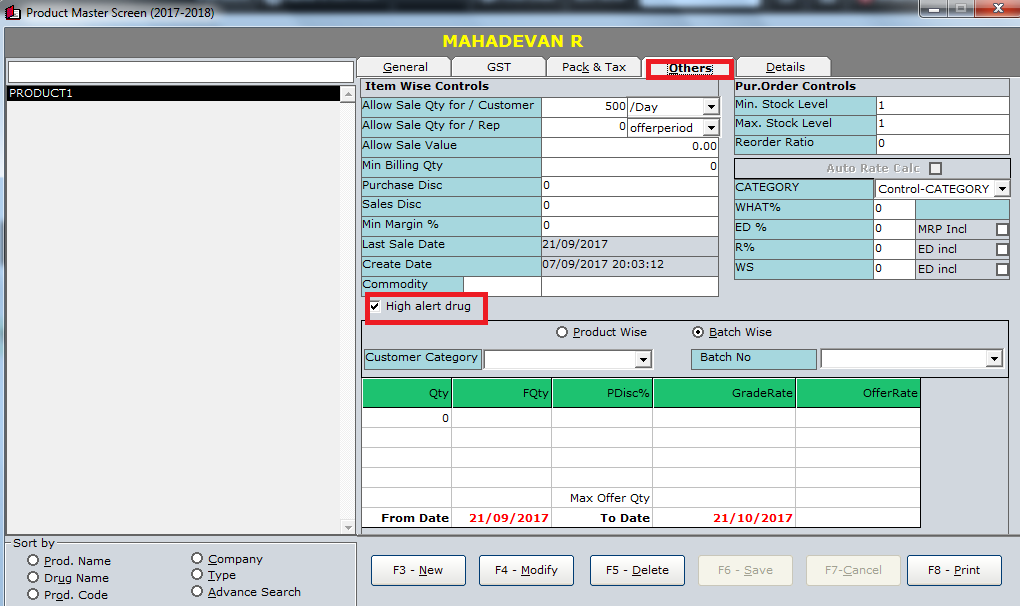
In Product Master.select the particular product and press F4 to modify.
In the "others" tab enable the high alert drug
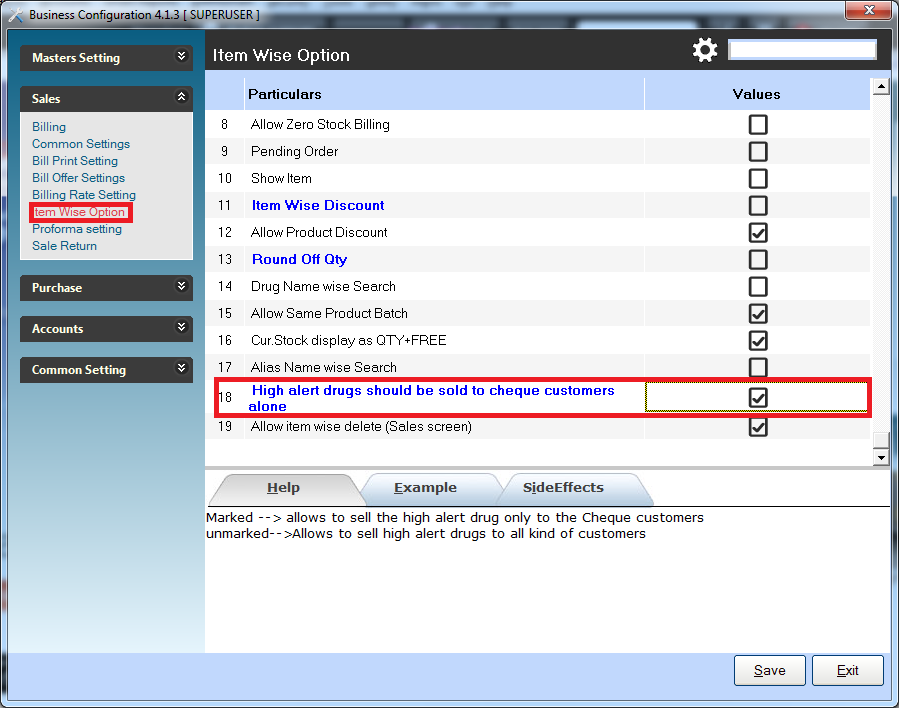
GO TO TOOLS->OPTIONS->OPTIONS->under item wise billing enable the option'high alert drug should be sold to cheque customer alone'
These products are termed as high alert drug.
In Product Master.select the particular product and press F4 to modify.
In the "others" tab enable the high alert drug
GO TO TOOLS->OPTIONS->OPTIONS->under item wise billing enable the option'high alert drug should be sold to cheque customer alone'
Related Articles
Product Delivery "On Hold"
What does "On Hold" mean? When an order is marked as "on hold," it means the progress has been temporarily paused. This can happen for various reasons, usually related to preparation or readiness issues on the customer's side or specific ...Product Onboarding Checklist
Welcome to the Product Onboarding process. Let's start with understanding the implementation duration for different packages. The implementation duration varies based on the package selected. Next, it's essential to ensure that your system meet ...Customer Master
Features Available in Customer Master: Go to Master- >Customer On the left hand side you have a list of customers in your database. This can be sorted by the filters which we have provided, for example, Customer Name wise, Customer Code Wise, etc. On ...Product Master
Steps Go to Master > Product On the left hand side you have a list of all the products in your database. You can sort them based on the filters such as Product Name Wise, Product Code Wise, etc. You can also apply a manufacture filter. On the right ...Product Category
Product Category Master Go to Master > Product Category To create a new Category, Press F3 Type the name of the Product Group (mandatory) Set the other parameters according to your business needs Press F6 to save the category For modifying a ...