How does a Purchase formula work?
Default Purchase formula:
The basic formula is Invoice Amount = A+B+C
A = Gross Amount(+)
B = Cash discount(-)
C = Tax(+)
How does Default Formula work?
Let us see how the default formula works with a simple example.
In the above example, for a cash discount of 10% and tax 5%, the default purchase formula works as follows.
Tax calculation based on Basic amount and Cash discount - [Default Formula]
A sample purchase with the Default formula is shown in the below image.
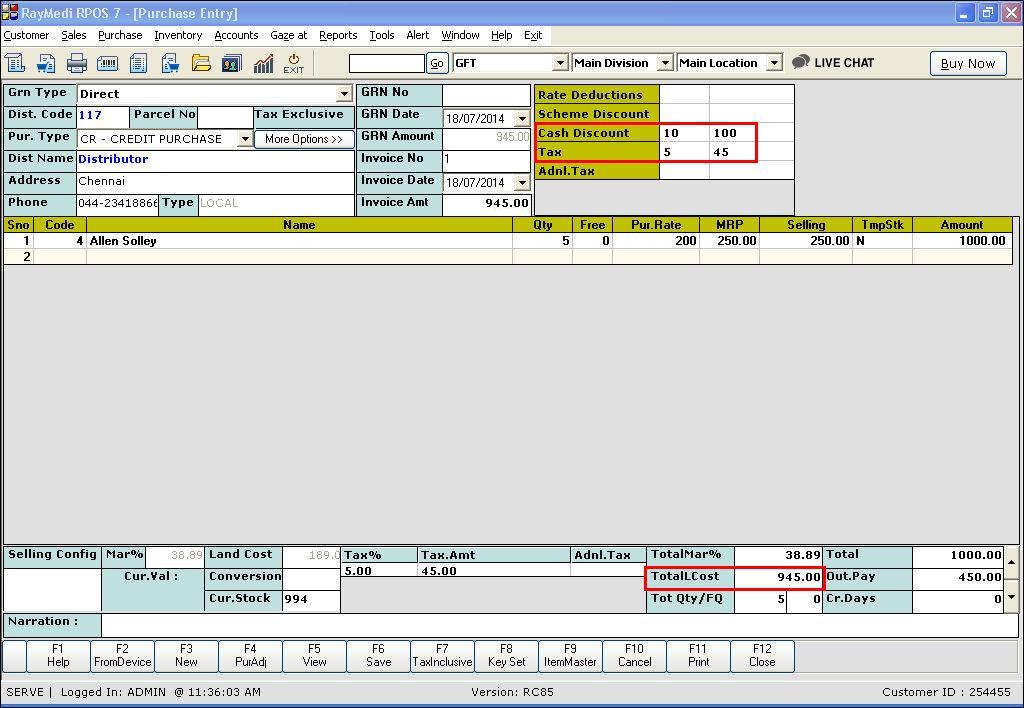
Configuring a new Purchase formula
By default, the tax amount is calculated based on (basic amount + Cash discount). To apply the tax only for the Basic amount, you have to configure a new purchase formula.
Tax calculation based on Basic Amount only - [New Formula Configured]
This is how the new purchase formula works after configuration.
A sample purchase with the above formula is shown in the below image.
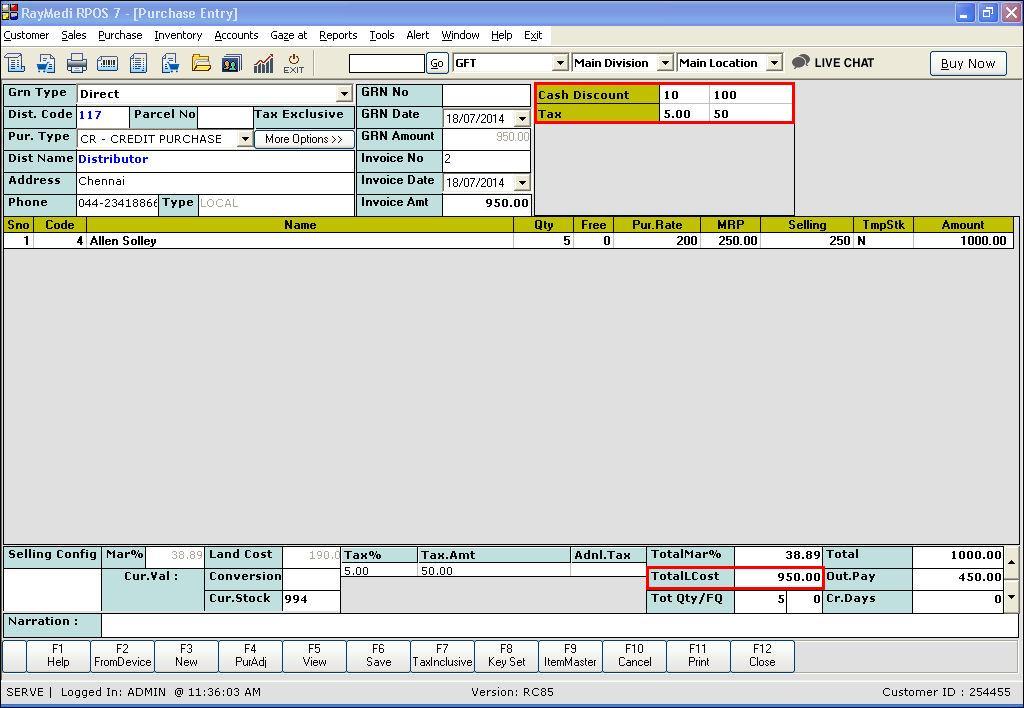
The basic formula is Invoice Amount = A+B+C
A = Gross Amount(+)
B = Cash discount(-)
C = Tax(+)
Invoice amount= (Gross amount) + (-Cash discount) + (Tax) |
How does Default Formula work?
Let us see how the default formula works with a simple example.
Item Name |
Qty |
Purchase Price |
Amount(Qty * purchase price) |
X |
1 |
1000 |
1000 |
Gross Amount(Basic) |
1000 |
In the above example, for a cash discount of 10% and tax 5%, the default purchase formula works as follows.
Tax calculation based on Basic amount and Cash discount - [Default Formula]
Caption |
Add/Sub |
Formula Calculation |
Result |
Cash Discount |
- |
Basic Amount |
1000-100 = 900 |
Tax |
+ |
Basic Amount + Cash Discount |
1000+(-100)= 900 Tax 5% =45 |
Invoice Amount |
945 |
A sample purchase with the Default formula is shown in the below image.
Configuring a new Purchase formula
By default, the tax amount is calculated based on (basic amount + Cash discount). To apply the tax only for the Basic amount, you have to configure a new purchase formula.
Tax calculation based on Basic Amount only - [New Formula Configured]
This is how the new purchase formula works after configuration.
Caption |
Add/Sub |
Formula Calculation |
Result |
Cash Discount |
- |
Basic Amount |
1000-100 = 900 |
Tax |
+ |
Basic Amount |
Tax 5% of 1000 =50 |
Invoice Amount |
950 |
A sample purchase with the above formula is shown in the below image.
Related Articles
Purchase Formula with TCS
Purpose: Generally, The TCS amount would not be added in the invoice amount and the landing cost. But, If the TCS amount needs to be included in the invoice amount, it can be done with this feature " Purchase Formula with TCS" This feature is ...How to configure Price Level Vs Formula?
Price Level Formula To work with Price Level Formula, you must have created price levels in the Price level Master. The major advantage of using price level formula is that you can customize time period, that is you can set validity for the price ...Work Flow of Product Enquiry
Work Flow of Product Enquiry Purpose: The purpose of the product enquiry workflow in RetailEasy Electronics vertical POS is to allow customers to request information about products. This can be helpful for customers who are looking for specific ...How to use RetailEasy [RPOS7] Purchase Formula?
In Gofrugal RetailEasy (RPOS7), the Purchase Formula is one of the most important configurations, as it controls how your item’s purchase rate is calculated inside the software. This directly affects: Stock Value Profit Margin Selling Price decisions ...TCS in Purchase Invoice
What is TCS? 'Tax collected at Source' is abbreviated as TCS. It was applicable for Sale of Goods for items like Tendu leaf, motor Vehicles, Scrap..etc. From 1st October 2020, TCS will be applicable on 'Sale of Goods' for all items. Both TDS & TCS ...