How to make a purchase entry?
Purchase entry
1. Click Purchase >> Purchase invoice to open the purchase invoice screen.
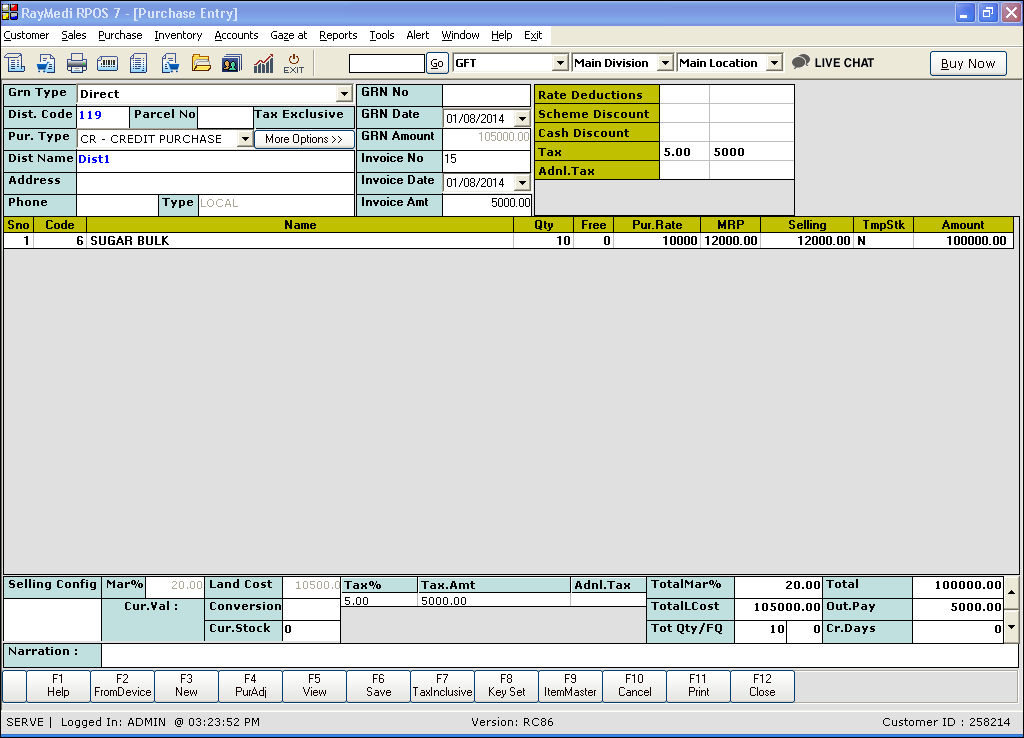
2. Make a purchase entry for the bulk item.
3. Press F6 or click Save to save the purchase.
1. Click Purchase >> Purchase invoice to open the purchase invoice screen.
2. Make a purchase entry for the bulk item.
3. Press F6 or click Save to save the purchase.
Related Articles
Record Expenses During Parcel Entry
A parcel entry is usually done when goods are received via any transport medium. Details such as the LR number, the invoices with its number and amount information, the supplier, weight, cases etc., are recorded while making the parcel entry. In our ...Optical Purchase In Attribute
Optical Purchase In Attribute Purpose: Using the Purchase In Attribute, we can include the additional information (Import Date) for any Optical Items when we make a Purchase entry. Since the cost of production in certain countries makes their ...Electronics Purchase In Attribute
Electronics Purchase In Attribute Purpose: Using the Purchase In Attribute, we can include the additional information (Import Date) for any Electrical Items when we make a Purchase entry. Since the cost of production in certain countries makes their ...TCS in Purchase Invoice
What is TCS? 'Tax collected at Source' is abbreviated as TCS. It was applicable for Sale of Goods for items like Tendu leaf, motor Vehicles, Scrap..etc. From 1st October 2020, TCS will be applicable on 'Sale of Goods' for all items. Both TDS & TCS ...Do you know how to perform Purchase Entry against a Purchase Order? Can we restrict the Purchase Entry with a Purchase Acknowledgement process?
What is a Purchase Order? A purchase order is a commercial source document that is issued by a business’ purchasing department when placing an order with its vendors or suppliers. The document indicates the details on the items that are to be ...