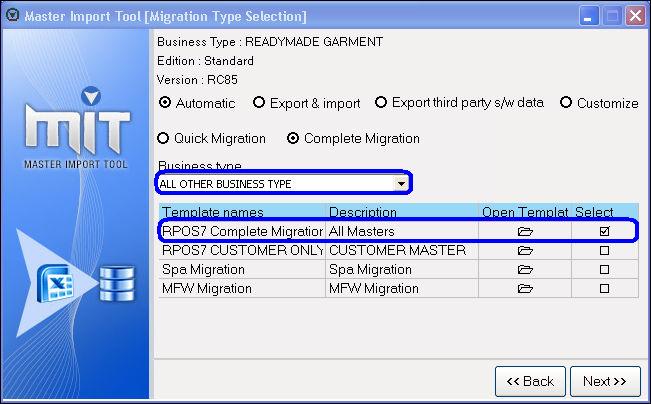
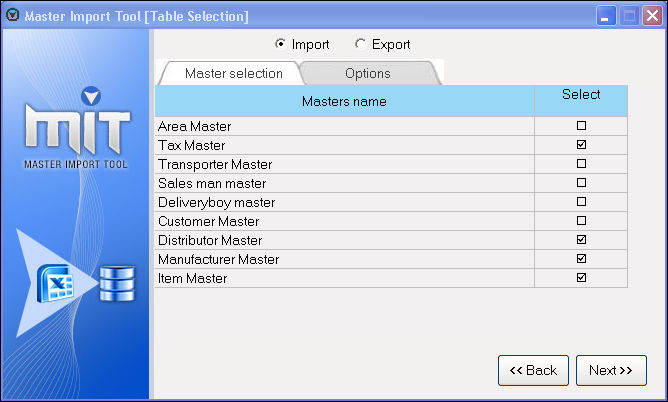
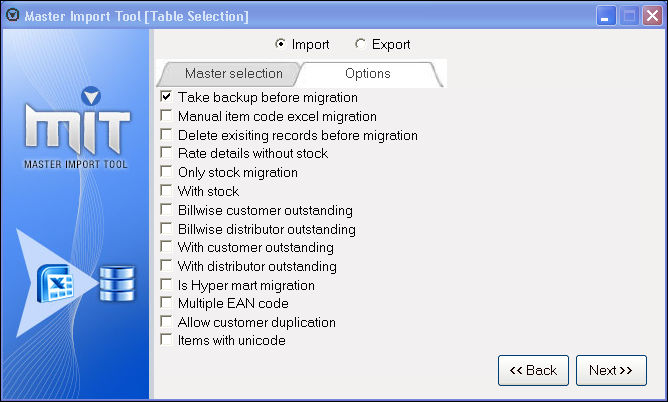
How to migrate the masters using the Master Import Tool?
All Masters migration
Related Articles
Scheduled Register Print using Easy Print Tool
Scheduled Register Print using Easy Print Tool Purpose: Compliance and Record Keeping: Scheduled Register Print ensures that the pharmacy complies with regulatory requirements, such as keeping detailed records of transactions, prescriptions, and ...Excel Import - SO functionality
Excel Import - SO functionality Purpose: The "Excel Import- SO" function key in the Sales Order section of the POS is used to import sales orders from an Excel spreadsheet into the POS system. This is a useful feature for businesses that receive a ...CSV Import Support in Wastage Entry
CSV Import Support in Wastage Entry Purpose: With the help of this module/option you can import the following information such as the date, time, item name, quantity, and reason for wastage, the system can automatically populate the relevant fields ...Barcode based offers using Datewise Pricing for Apparel Business.
In an apparel business, customers cannot currently run barcode-based offers, as this functionality is not available in the HQ Offer Management module. To address this, an alternative solution exists through the Datewise Pricing feature at the outlet ...Item Master - Out Attribute
Item Master - Out Attribute Purpose: To collect more details in terms of optical like Spectacles - 1 (Left & Right for cylindrical, Sphere, AS, PD), Spectacles - 2 (RE, Distant Vision, for cylindrical, axis or Sphere either for right eye or left) ...