How to set a default salesman Commission?
SalesMan Commission - Default (Applicable with no condition)
Use this commission type to provide a commission to a particular salesman irrespective of the sales amount and target.
Set the default commission value in the Salesman Master. The default commission is applied to the respective salesman for all the sales made by him. If you want to provide the commission % on a regular basis with no target condition, this option is advisable.
Steps to create a record in SalesMan Master.
Use the SalesMan Master screen to provide default commission to the Salesmen as well as to the Agents.
1. Click Sales>> Masters >> SalesMan Master. The SalesMan Master screen is displayed.
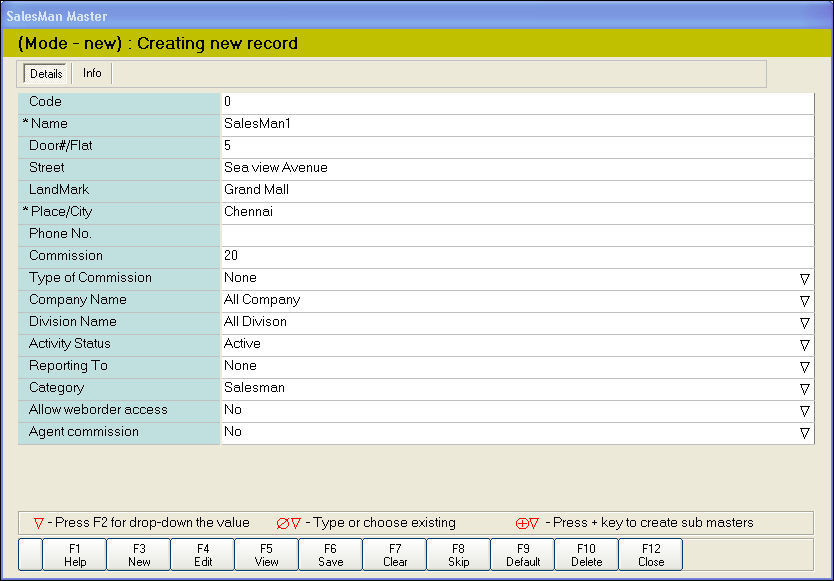
2. In the Name field, enter the name of the salesman.
3. In the Address section, enter the contact details of the salesman.
4. In the Commission field, enter the commission value in terms of percentage.
5. In the Type of Commission field, press F2 key. Select the option None from the drop-down list.
6. In the Company Name and Division Name fields, Press F2 key to select the company name and division name.
7. In the Activity Status field, press F2 key. Select from the following options-
9. In the Category field, press F2 key. Select the option Salesman.
10. In the Allow web order access field, press F2 to select the option Yes or No.
11. In the Agent Commission field, press F2 key. Select option No.
12. Click Save or press F6 to save the Salesman Master.
For Agent Commission, click here
Use this commission type to provide a commission to a particular salesman irrespective of the sales amount and target.
Set the default commission value in the Salesman Master. The default commission is applied to the respective salesman for all the sales made by him. If you want to provide the commission % on a regular basis with no target condition, this option is advisable.
Steps to create a record in SalesMan Master.
Use the SalesMan Master screen to provide default commission to the Salesmen as well as to the Agents.
1. Click Sales>> Masters >> SalesMan Master. The SalesMan Master screen is displayed.
2. In the Name field, enter the name of the salesman.
3. In the Address section, enter the contact details of the salesman.
4. In the Commission field, enter the commission value in terms of percentage.
5. In the Type of Commission field, press F2 key. Select the option None from the drop-down list.
6. In the Company Name and Division Name fields, Press F2 key to select the company name and division name.
7. In the Activity Status field, press F2 key. Select from the following options-
- Active - The default commission is applied to the salesman
- Inactive - The commission value is not applied to the salesman
9. In the Category field, press F2 key. Select the option Salesman.
10. In the Allow web order access field, press F2 to select the option Yes or No.
11. In the Agent Commission field, press F2 key. Select option No.
12. Click Save or press F6 to save the Salesman Master.
For Agent Commission, click here