Tender rule
Purpose: The Tender Rule feature in TruePOS is used to configure service charges based on the bill amount for specific payment types. Currently, the available payment types are:
- Cash
- Wallet
Pre-requisite:
Go to tools-->configuration-->Business configuration-->enable calculate service charge for tender as cash or wallet according to your need and click on save button.
Steps to Create a Tender Rule
1. Open Tender Rule Entry
Navigate to Sales → More → Tender Rule Entry.
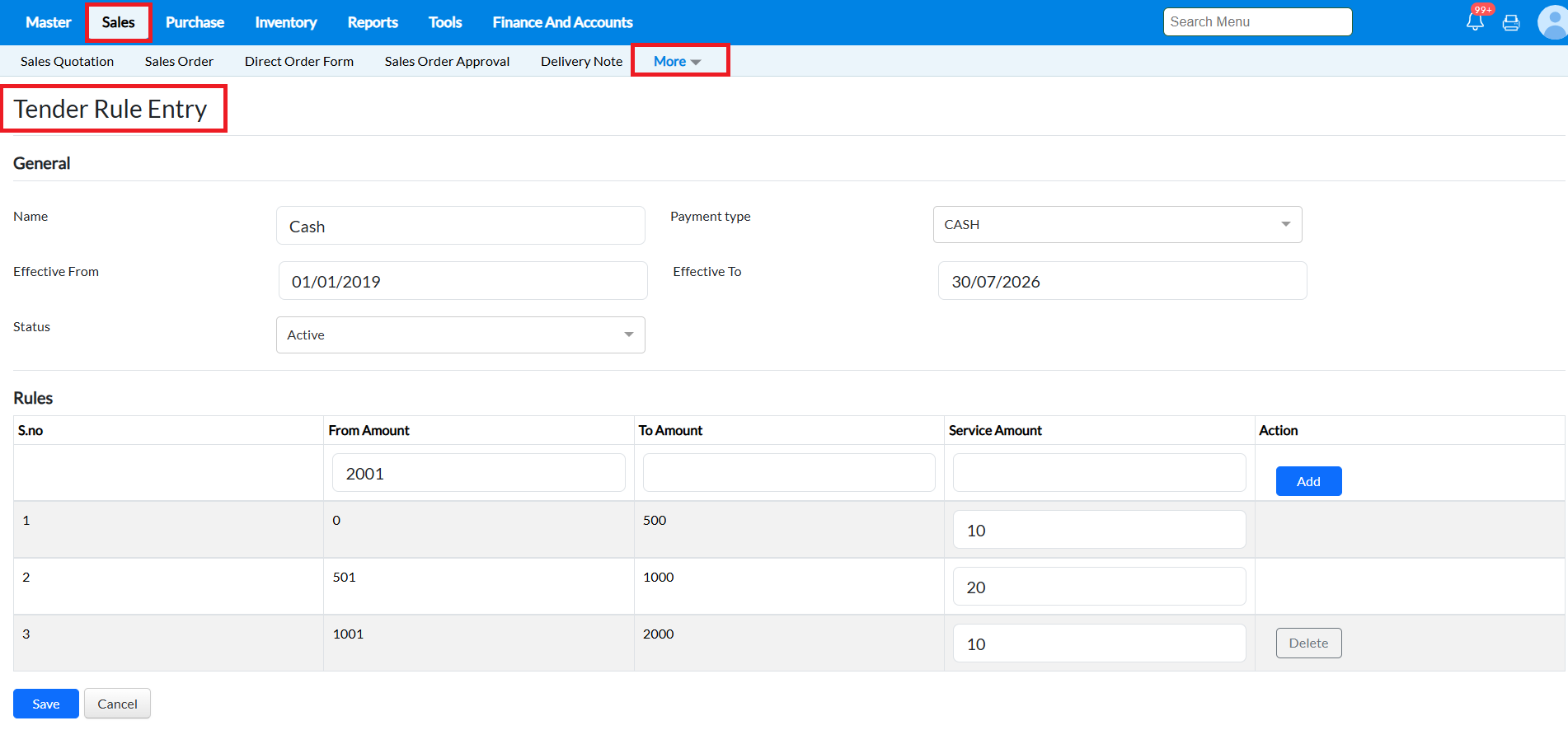
2. Enter General Details
Fill in the following fields:
- Name:Enter a name for the tender rule (Example: Cash).
- Payment Type:Select the payment type. Available options are Cash and Wallet.
- Effective From: Select the date from which the rule should be applicable.
- Effective To: Select the end date for the rule.
- Status: Select Active to enable the rule.
3. Configure Rule Slabs
In the Rules section, define the bill amount range and the corresponding service charge.
Enter:
- From Amount – Starting bill amount.
- To Amount – Ending bill amount.
- Service Amount – Service charge to be applied for that amount range.
- Click Add to insert the rule.
Repeat the process to create multiple slabs if required.
Example:
| From Amount | To Amount | Service Amount |
|---|---|---|
| 0 | 500 | 10 |
| 501 | 1000 | 20 |
| 1001 | 2000 | 10 |
4.Save the Rule
After entering all the required slabs:
- Verify the details.
- Click Save.
The tender rule will become active based on the configured effective date.
How do this will work in sales bill?
In sales bill screen select the customer and item details and then click on save button, after that while clicking on save button, once you click
the cash tender according to the tender rule the service amount will apply automatically and you can save the bill.
the cash tender according to the tender rule the service amount will apply automatically and you can save the bill.
Related Articles
Loyalty Rule
Purpose: Loyalty programs are a proven method for customer retention in retail. TruePOS provides a simple yet effective loyalty management feature that allows businesses to reward customers with points based on their purchases. These points can be ...How to create a Loyalty Rule, map and apply it to a customer in RetailEasy OnCloud?
Loyalty is an important parameter to attract and retain customers in the retail industry. A very simple way of achieving Loyalty is by setting points in proportion with the purchase amount and accumulating them for subsequent purchases. The ...Expiry Rule
Purpose: The Expiry Offer feature in TruePOS allows shop owners, especially in departmental stores, to offer discounts on items nearing their expiry dates. This helps clear old stock efficiently while reducing losses due to expired goods. Example ...Tender Master
Introduction to Tender Master Tender refers to the different forms of payment accepted by a retail store for sales and other transactions. TruePOS provides the Tender Master, where businesses can add and manage different payment methods such as Cash, ...Tender Type Value
Introduction to Tender Type Value Tender Type Value includes only the Credit Tender Type. Under the credit mode, which is created in the Tender Type Master, specific tender values can be mapped accordingly. Example: If a Tender Type Master is created ...