Stock update approval
Stock Update Approval
Intro on Stock update approval
Stock maintaining and management is one of the most important and vital task for every businesses. Stock update approval is one of the efficient feature introduced by Truepos in order to keep track of each stock edit and update done by any staffs. In one screen, you can verify the stock update and make the powerful decision as to whether to update the stock or not
Stock update approval is a mandatory process followed after putting stock update. The Stock Update Approval enables you to review the stock on-hand quantity differences posted in Stock Update Entry screen and decide if the stock quantity change can be approved or rejected.
Steps for Stock Update Approval.
1. After Completing the Stock Update entry do the following process Click Inventory > Stock Update Approval.
( More To Know about stock update entry → https://help.true-pos.com/Stock-Update-Entry.html )
( More To Know about stock update entry → https://help.true-pos.com/Stock-Update-Entry.html )
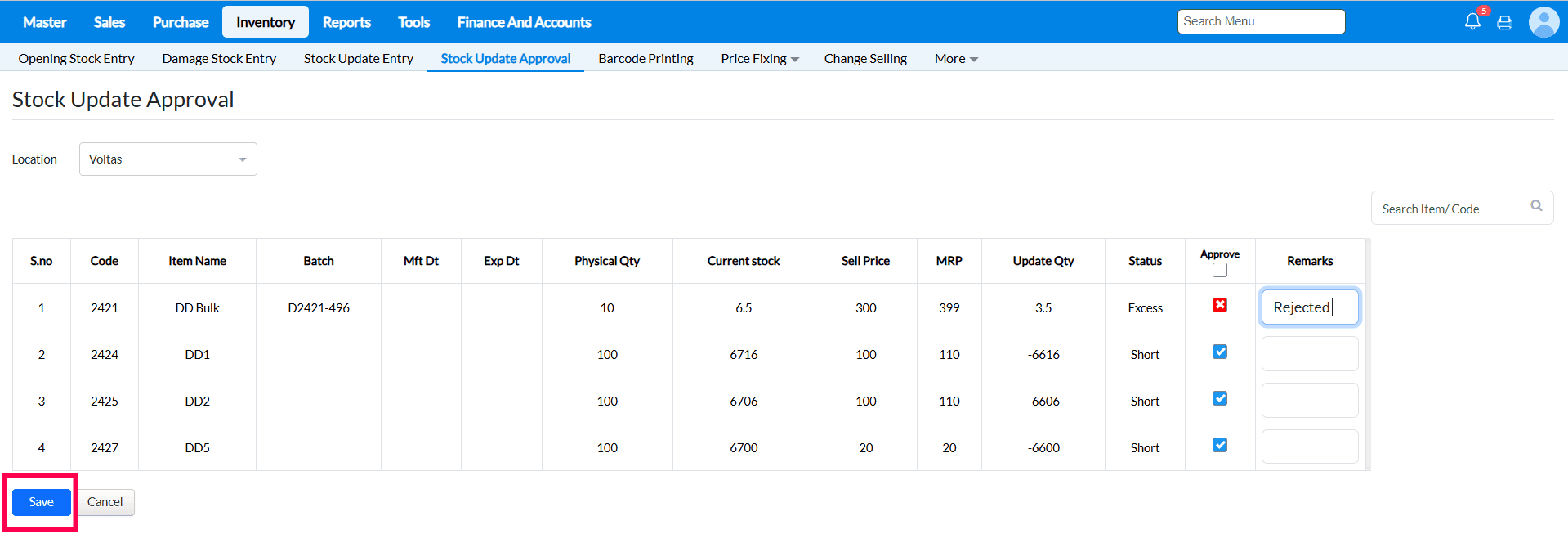
2. Select the Location Through Drop Down then list of pending Stock update Approval item will display.
3. The list of the items pending to be approved will be displayed. Based on the current stock and the updated physical quantity, the status column in the screen, will show "EXCESS" or "SHORT" or "EQUALS". It will also who the difference in stock.
a. Based on the status, Select any one of the following from the Approve list
1. Approved - to replace the newly entered physical quantity in TruePOS.
2. Not Approved - to ignore the newly entered physical quantity.
b. Specify the Remarks for your decision, if any.
4. Press save for the changes.
FAQ
Q1. Can stock update approval done branch-wise?
→ Yes, before loading the items, the branch need to be selected from the top right corner dropdown
Q2. How can the stock update approval rights be given and who can approve the updated stock?
Q2. How can the stock update approval rights be given and who can approve the updated stock?
→ Stock approval will be done by admin. This mapping can be done for each user in Tools -> Configurations -> Security configurations -> Employee master. For setting the approval manager for a particular staff or user, click on modify against the user. Under the approval manager field, you can map any user who need to approve. It can be either admin or any other user.
Q3. Where to check the Stock update approval status?
Q3. Where to check the Stock update approval status?
→ The approval status can be checked in Reports -> Inventory -> Stock analysis -> Stock update detail report. Refer the link Stock Update Detail Report
Q4. Once Stock Update approval done can we edit the status?
→ Once Stock update approval done then we cant edit that one. In this case again need to do stock update for that item.
Q4. Once Stock Update approval done can we edit the status?
→ Once Stock update approval done then we cant edit that one. In this case again need to do stock update for that item.
Related Articles
Stock Update Entry
Stock update entry Purpose : The Stock Update screen is used to adjust stock mismatches between the physical stock and the stock quantity in TruePOS. If you notice any difference between the stock available in your store and the quantity shown in the ...Damage/Wastage Stock Entry
Damage/Wastage Stock Entry Purpose: The Damage Stock Entry in Retail POS is used to record items that are broken, expired, or otherwise unsaleable. It helps keep inventory levels accurate by removing damaged stock from sell-able quantity. This ...Stock Update Migration
Stock Update Migration Purpose : 1) To correct stock quantity and match the system stock and physical stock for more items in single shot. 2) To Update the stock for all the batches in single shot. For Ex : If an items has 2 or more batches, stock ...Business Configuration[Approval]
Purpose:- The configurations in the Approval tab display the types of approvals used in TruePOS such as Purchase and Sales approvals and explain the functionalities of each configuration.” Steps to access Approval Business Configurations:- 1. ...Create New Branch in TruePOS
Setting up a new branch, outlet, or warehouse distribution centre in TruePOS eliminates redundant processes such as repeatedly adding or importing items and distributors. TruePOS simplifies the management of items, prices, taxes, and stocks across ...