How to add shipping address via sales screen?
Purpose:The Shipping Address option in the Sales Quotation screen is used to maintain and save customer delivery address details separately for the transaction.
This feature helps to:
- Store the exact delivery location for the quotation.
- Manage customer orders with different billing and shipping addresses.
- Ensure accurate delivery and shipment processing.
- Avoid manual entry of address details during further sales processes.
- Improve order tracking and customer communication.
2.Enter the required shipping details such as:
Name,Address 1,Address 2,Landmark,Area,City,STD Code,Phone,Mobile,Email ID and State Code
3.Verify all entered details and Click OK to save the shipping address.
And then complete by loading the items and continue saving the quotation using the F6 Save option.
To check the shipping details on the sales report :
For sales quotation: Go to Reports-->orders and quotations--> sales quotation summary/ detail report
For sales order: Go to Reports-->orders and quotations-->Sales order summary/ detail report
For Delivery Note: Go to Reports-->Delivery Reports-->Sales Delivery Note Summary/ Sales Delivery Note detail report.
For sales bill -Go to Reports --> Sales --> Sales --> Daily Sales Report [Bill No Wise]. You can find the shipping name as per the below screen shots.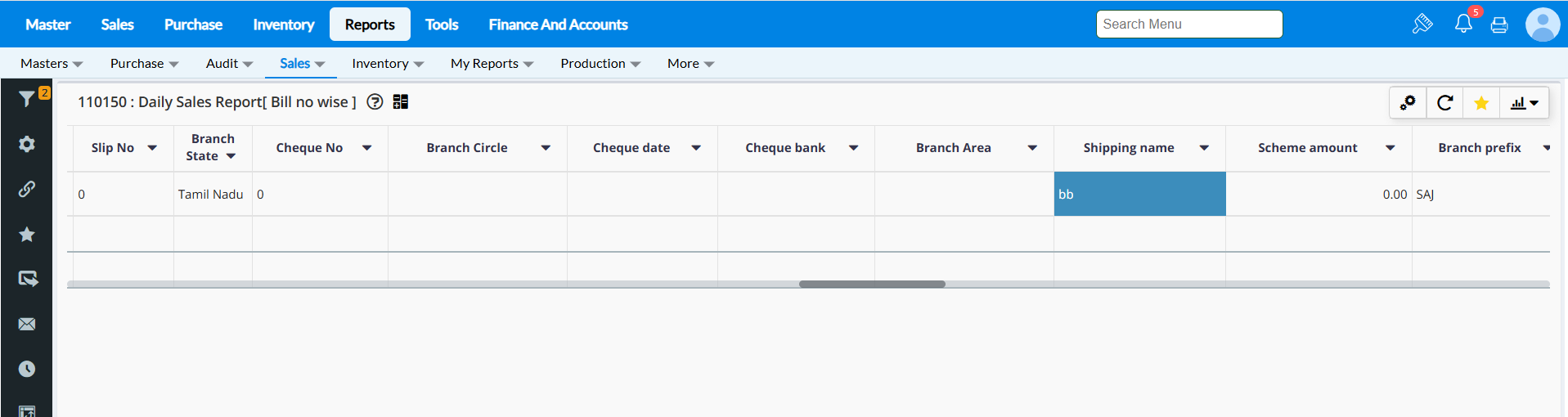
If the respective below highlighted columns in the report is not available then you can enable the columns by referring this attached help document : Report settings
Related Articles
How to create Quick add customer via sales screen?
Purpose- To add the customer details during billing.We can add the quick add customer by entering the phone number also.Apart from adding Customer in Customer screen or Importing Customer in Master Migration screen, you can also add the Customers in ...How to add New Shipping Address in RetailEasy On Cloud
Steps to Add Multiple Address Enable the 'Enable Multiple Address for Customer and Supplier' configuration to add multiple addresses to Customer master and click Save. Steps to Add Multiple Contact Details 1.Go to Master → Customer Master → Edit the ...What is Sales Order in RetailEasy on-cloud?
Sales Order Purpose - A Sales Order is an entry sent to your customers confirming the items and prices of a sale. A sales order is usually created after a quotation is accepted by your customers and your items are ready to be shipped or delivered to ...Business Configuration[Quick Add]
Quick Add Configurations: Purpose:- The configurations present in the Quick Add tab allows to enable or disable functionalities in the Sales bill Quick Add module screen. Steps to access Quick Add Business Configurations:- 1. Navigate to Tools -> ...How to provide different ship to address ?
Providing different ship To Address Different ship to address can be specified, if you are placing an order from one branch and want to add the address where the items need to be delivered. Note: This function will be available based on the outward ...