Stock update detail report
Stock Update detail report
Purpose - The Stock Update Detail report displays the stock update entries data item wise and stock update no wise, where the status of the Stock Update request can be verified.
Steps To open the stock update detail Report
1. Click Reports > Inventory > Stock Analysis > Stock Update Detail Report
2. Specify the date filter within which the Stock Update Requests were created.
3. From Standard Filter Select the Branch from the Location list.
4. Click Apply.The Stock Update Status appears as shown below:
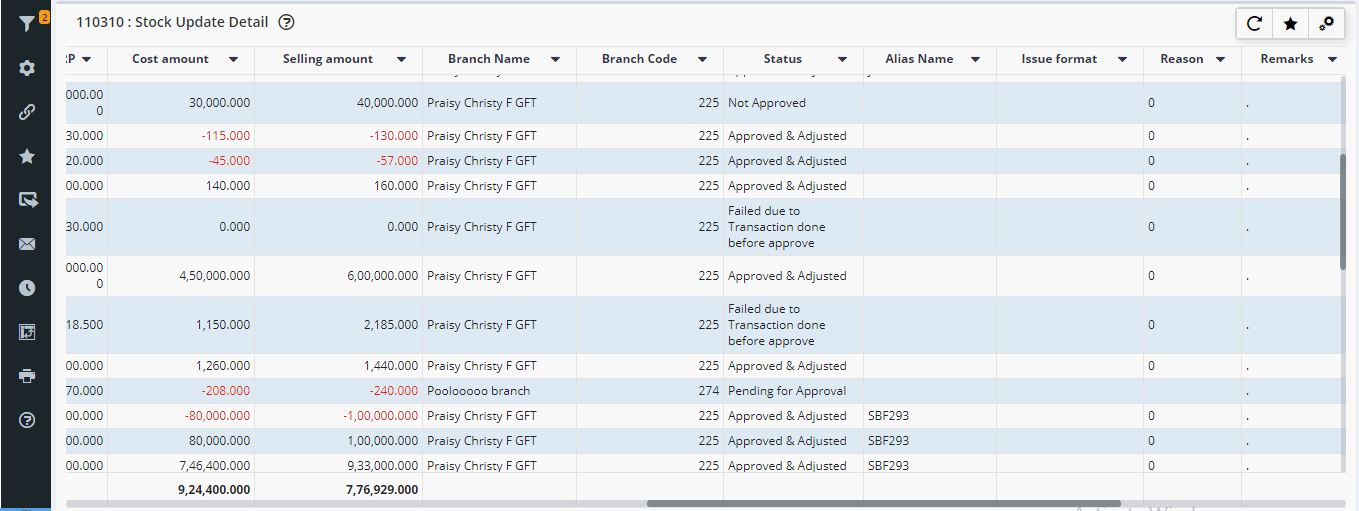
Status description :
1) Failed - The stock update approval will fail in 2 cases
a. If any transactions has been done against the stock after putting the stock update entry and before doing stock update approval
b. If the entered quantity is greater than purchased quantity
Refer Stock Update Entry to lessen update the Qty.
2) Pending for approval indicates the number of items whose Update Quantity is not yet reviewed.
Refer Stock Update Approval to review and update the stock.
3) Approved & Adjusted indicates the number of items whose Update Quantity is approved and adjusted successfully.
a. If any transactions has been done against the stock after putting the stock update entry and before doing stock update approval
b. If the entered quantity is greater than purchased quantity
Refer Stock Update Entry to lessen update the Qty.
2) Pending for approval indicates the number of items whose Update Quantity is not yet reviewed.
Refer Stock Update Approval to review and update the stock.
3) Approved & Adjusted indicates the number of items whose Update Quantity is approved and adjusted successfully.
4) Not Approved indicates the number of items whose Update Quantity is rejected by the Admin or Managing Authority.
FAQ
Q1. Can we export the Stock update detail Report.
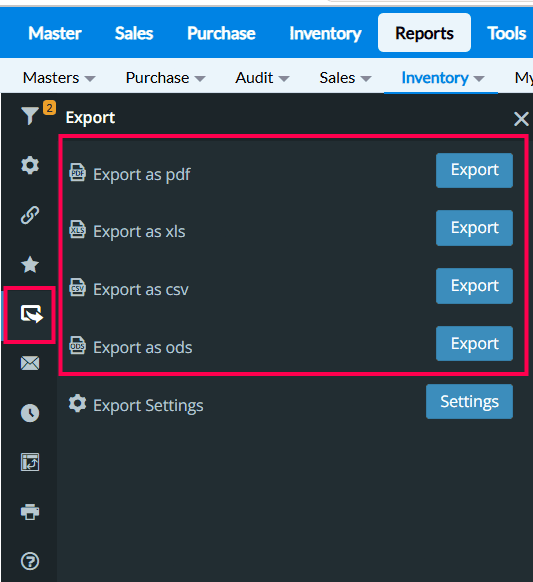
→ Yes, We can export the stock update details report in (PDF, XMs, CSV, ODS ) Format. Follow the link for more info about export report setting ( https://help.true-pos.com/Smart---Report---Export---Report.html )
Q1. Can we export the Stock update detail Report.
→ Yes, We can export the stock update details report in (PDF, XMs, CSV, ODS ) Format. Follow the link for more info about export report setting ( https://help.true-pos.com/Smart---Report---Export---Report.html )
Related Articles
Stock Update Entry
Stock update entry Purpose : The Stock Update screen is used to adjust stock mismatches between the physical stock and the stock quantity in TruePOS. If you notice any difference between the stock available in your store and the quantity shown in the ...Stock update approval
Stock Update Approval Intro on Stock update approval Stock maintaining and management is one of the most important and vital task for every businesses. Stock update approval is one of the efficient feature introduced by Truepos in order to keep track ...How to perform a stock audit at your store in TruePos ?
What is the purpose of Stock Audit ? Purpose : Stock audit, also known as inventory audit, is a process of verifying and validating the physical stock of goods or materials held by a company or organization. It involves comparing the physical stock ...How to check the Stock Update Detail in RetailEasy on-cloud?
RetailEasy on-cloud has the Reports features, covering all business operations, providing comprehended results from the data. Stock Update Detail is the Report that covers the data on Stock Update Entry and corresponding approvals. Benefits of ...Stock Update Migration
Stock Update Migration Purpose : 1) To correct stock quantity and match the system stock and physical stock for more items in single shot. 2) To Update the stock for all the batches in single shot. For Ex : If an items has 2 or more batches, stock ...