How to Create a combo item in Item Master?
Steps for Creating combo items in Item Master -
- Click Inventory > Master > Item Master or press CTRL + I.
- The Item Master screen is displayed. Create new records for Combo pack.
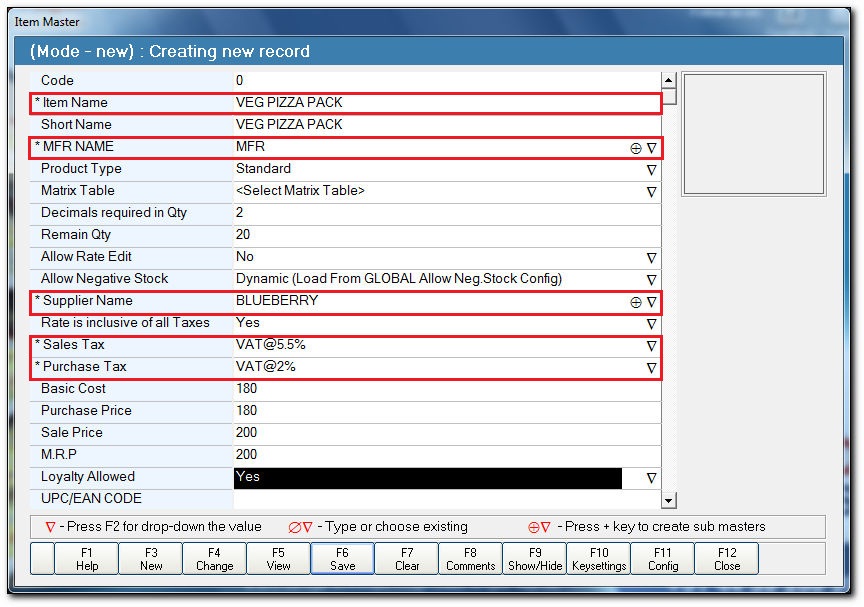
- In the Creating new record section:
- In the Item Name field, enter the item name.
- In the MFR NAME field, press F2. The list of Manufacturer Details is displayed, select the manufacturer name.
- In the Supplier Name field, press F2. The list of Supplier Details is displayed, select the supplier name.
- In the Sales Tax field, press F2. The list of Tax Details is displayed, select the sales tax.
- In the Purchase Tax field, press F2 . The list of Tax Details is displayed, select the purchase tax.
- In the Basic Cost field, enter the basic cost of the item.
- In the Purchase Price field, enter the purchase price of the item.
- In the Sales Price field, enter the sales price of the item.
- In the M.R.P field, enter the maximum retail price of item.
Note: Scroll Down or press ENTER to view the additional fields.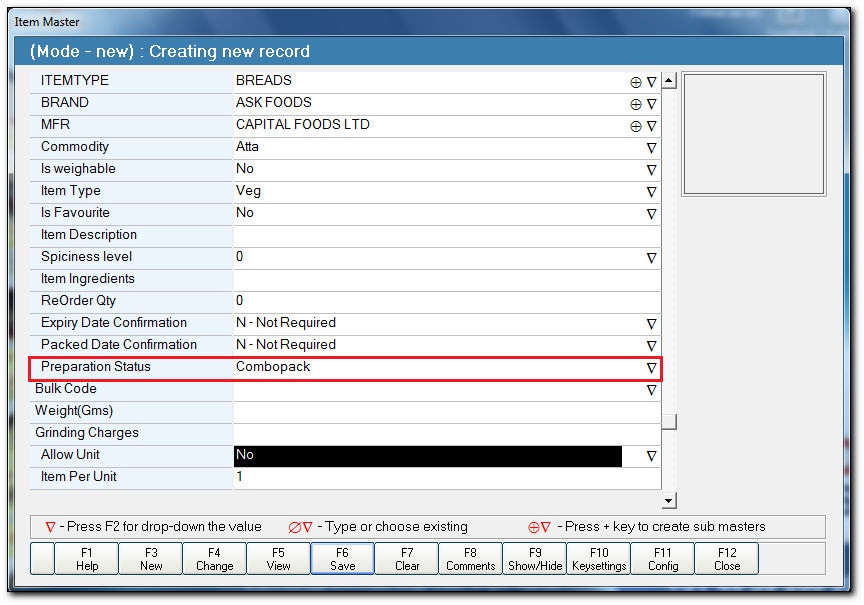
- In the ITEMTYPE field, press F2. The list of Item Details is displayed, select the item.
- In the BRAND field, press F2. The list of Brand Details is displayed, select the brand.
- In the Commodity field, press F2. The list of Commodity Details is displayed, select the commodity type.
- In the Preparation Status field, press F2. The list of Preparation Status is displayed, select the Combopack.
- In the Item Name field, enter the item name.
- Click Save or press F6 to save the record.
- A confirmation message is displayed. Click OK.
- Click Close or press F12 to close the screen.
- A confirmation message is displayed. Click Yes.
Related Articles
How to Create a combo item in Combopack Configuration?
Steps for creating combo item in Combopack Configuration - Click Inventory > Master > Combopack Configuration. The Combo pack Configuration screen is displayed. In the Combopack Configuration section: In the Combopack Name field, press ENTER. A ...How to Check the combo pack Sales Report?
The details report for Combo pack item and child are obtained through - Combo pack Sales - Detailed Combo pack Sales - Summary Steps for checking the Combopack Sales - Detailed Report - Click Reports > Sales > Analysis > Combo Pack Sales - detailed. ...What is Combo Configuration and the purpose of the combo configuration?
Purpose:- Combo is the short form of the word 'Combination'. Combination is a set of two or more different items put together. In business point of view the combo packs play a vital role to attract customer to buy the product in stores as customer ...How to Make a stock entry in Opening Stock for a combo pack?
Steps for making a stock entry in Opening Stock - Click Inventory > Opening Stock Entry or press CTRL + O. The Opening Stock screen is displayed. In the Code field, press ENTER. The list of Product List is displayed, select the combo item. In ...Concept of Dynamic Combo
Dynamic Combo for Assorted Sweet Boxes (ServEasy) During festive seasons, sweet shops commonly receive requests for assorted sweet boxes—where customers choose multiple sweets packed together for quick sale. These assortments often include ...